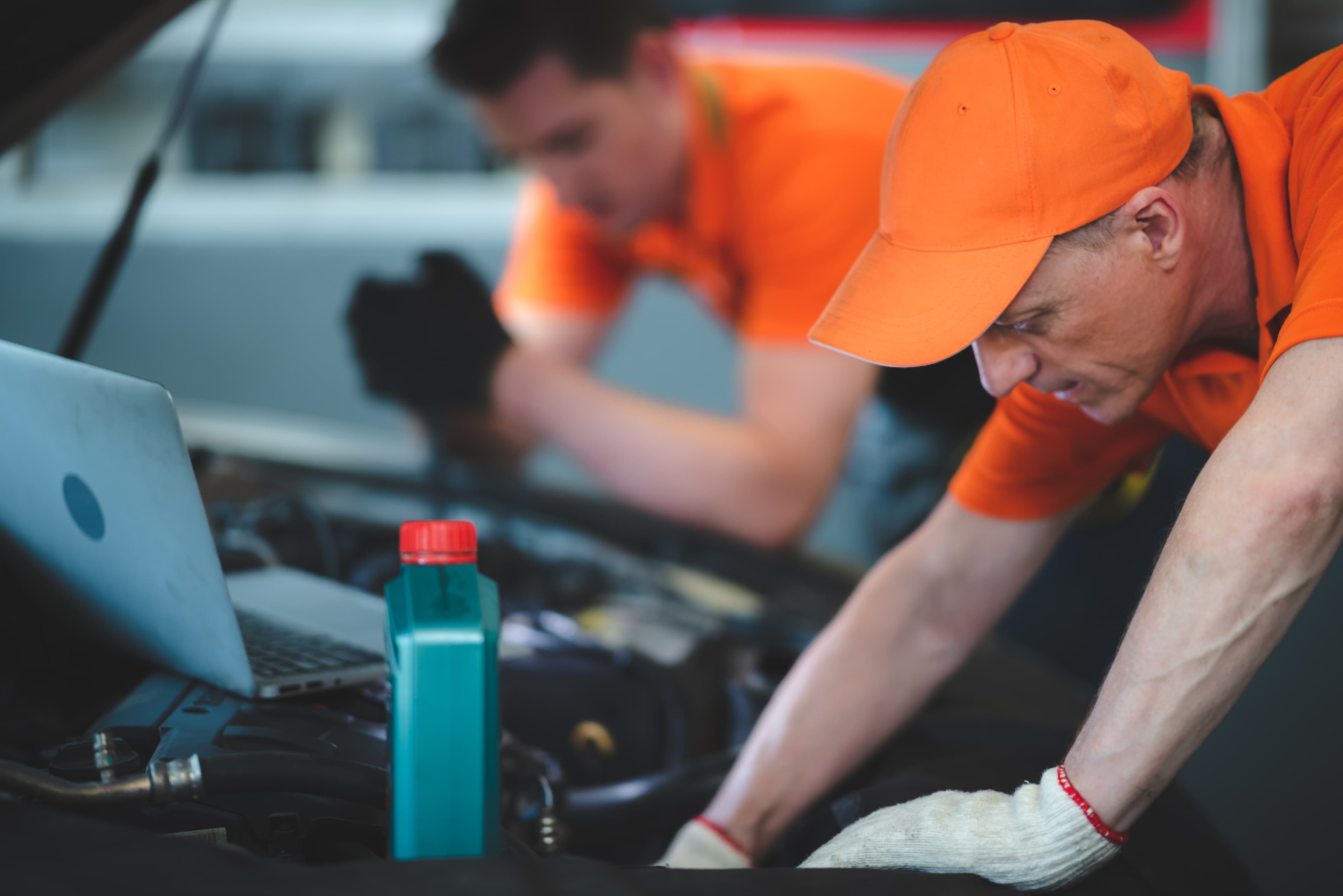
From the moment a customer books in, Axlewright.AI takes over. Onboarding, symptom triage, repair quoting, technician dispatch, parts ordering, and final invoice — all automated by AI, so your team focuses on fixing cars, not chasing paperwork.
Your shop runs on information that currently lives in ten different places. These ten modules bring it into one AI layer — covering everything from the first customer enquiry and lead follow-up through to quote generation, parts lookup, job handover, and ongoing vehicle health tracking. No silos. No re-entry.
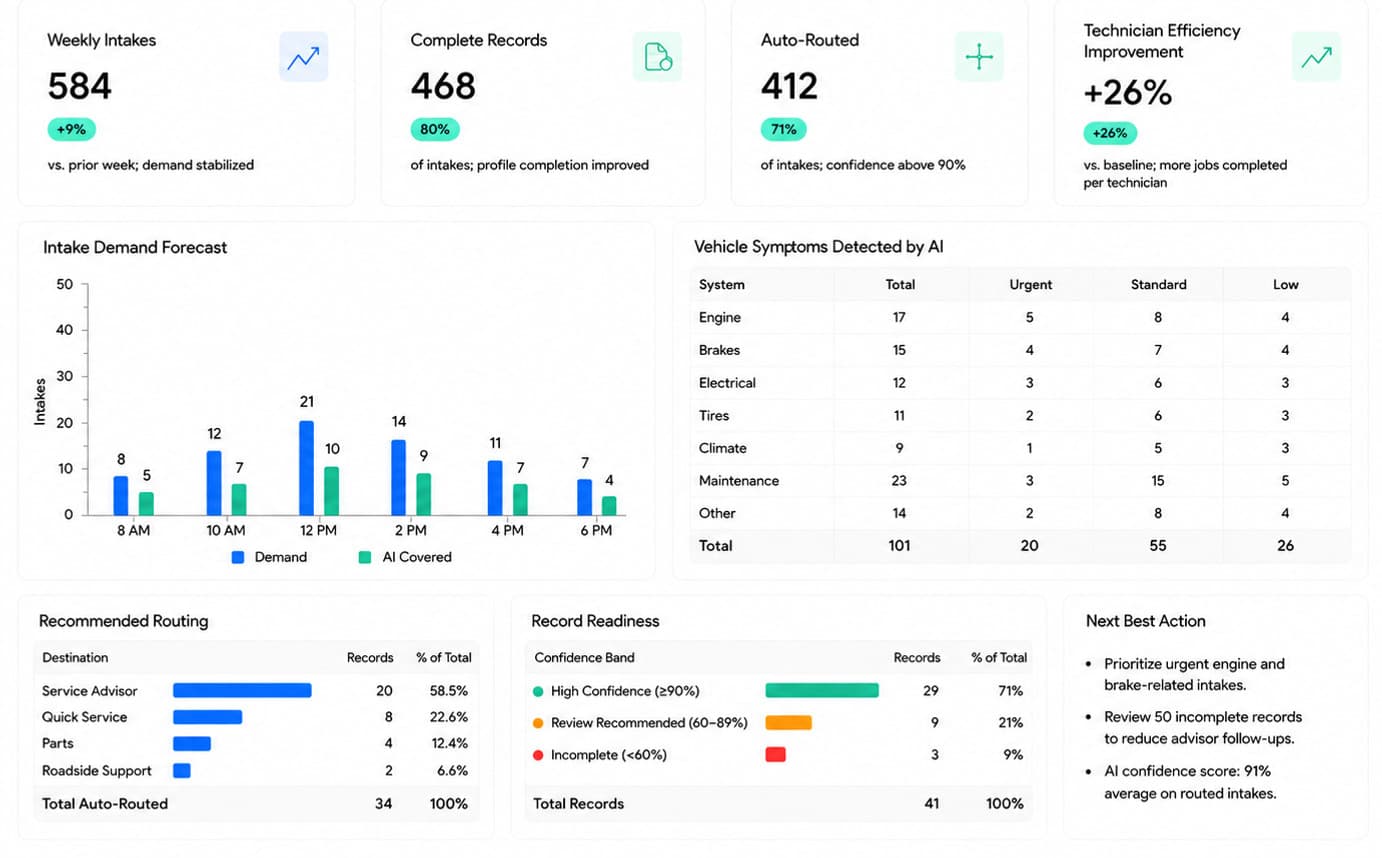
app.axlewright.ai/intakeLIVE · INTAKE
Axlewright.AI — Service Intake Assistant dashboard
Operational Efficiency
Zero
Manual data entry
Unlike traditional shop systems, data follows the vehicle automatically. From voice intakes to final invoices, your team never wastes time re-typing the same information, drastically reducing administrative overhead.
Speed of Service
41%
Faster handoff times
Technicians receive repair orders with advisor notes and diagnostic data already pre-filled. This seamless transition maximizes active bay time and minimizes idle waiting periods.
Revenue Impact
31+
Urgent jobs flagged
Ensure no high-margin ticket falls through the cracks. Critical jobs are automatically prioritized in the queue, directly increasing monthly service revenue.
Diagnostic Data
Connectivity
Live data from software
Data flows seamlessly into the AI from technicians, road tests, and specialized automotive software. This connected ecosystem accelerates diagnostics and improves repair accuracy.
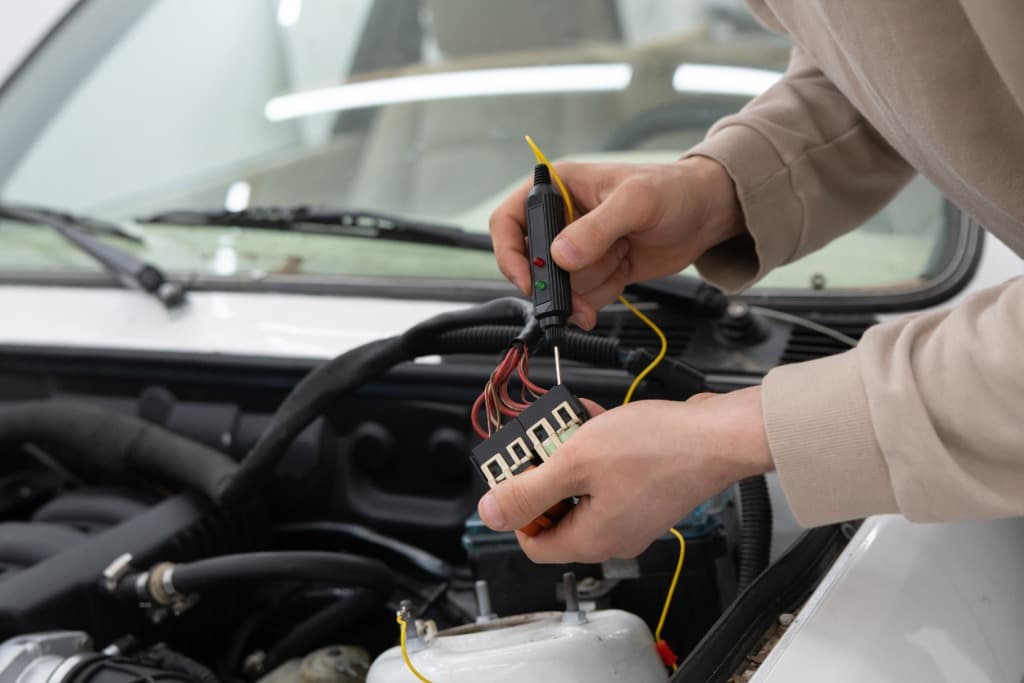
Hardware Connectivity Note: Axlewright.AI does not connect directly to vehicles, lifts, or heavy machinery. All diagnostic and sensor data flows into the platform via your shop’s existing specialized diagnostic software, scan tools, and IoT gateways.
Modules
Centralised Command Center with different specialist modules.
One Dashboard at the centre. Purpose-built modules around it — intake, lead scoring, document extraction, routing, repair quoting, inventory intelligence, handover automation, asset health, and a technical co-pilot. One subscription. Zero silos.
01Customer Application Assistant
02Lead Conversion Assistant
03Document Extraction Automation
04Smart Routing Engine
05Repair Quote Generation
06Inventory Catalog Intelligence
07Handover Automation
08Technical Knowledge Co-pilot
09Asset Health Monitoring
10Customer Chatbot
One platform
A unified suite. Every job. Zero re-entry.
From intake to the signed invoice , so nothing is typed twice and no detail is lost.
Customer intelligence, built in.
From first inquiry to booked appointment — every customer touchpoint is handled, routed and logged automatically.
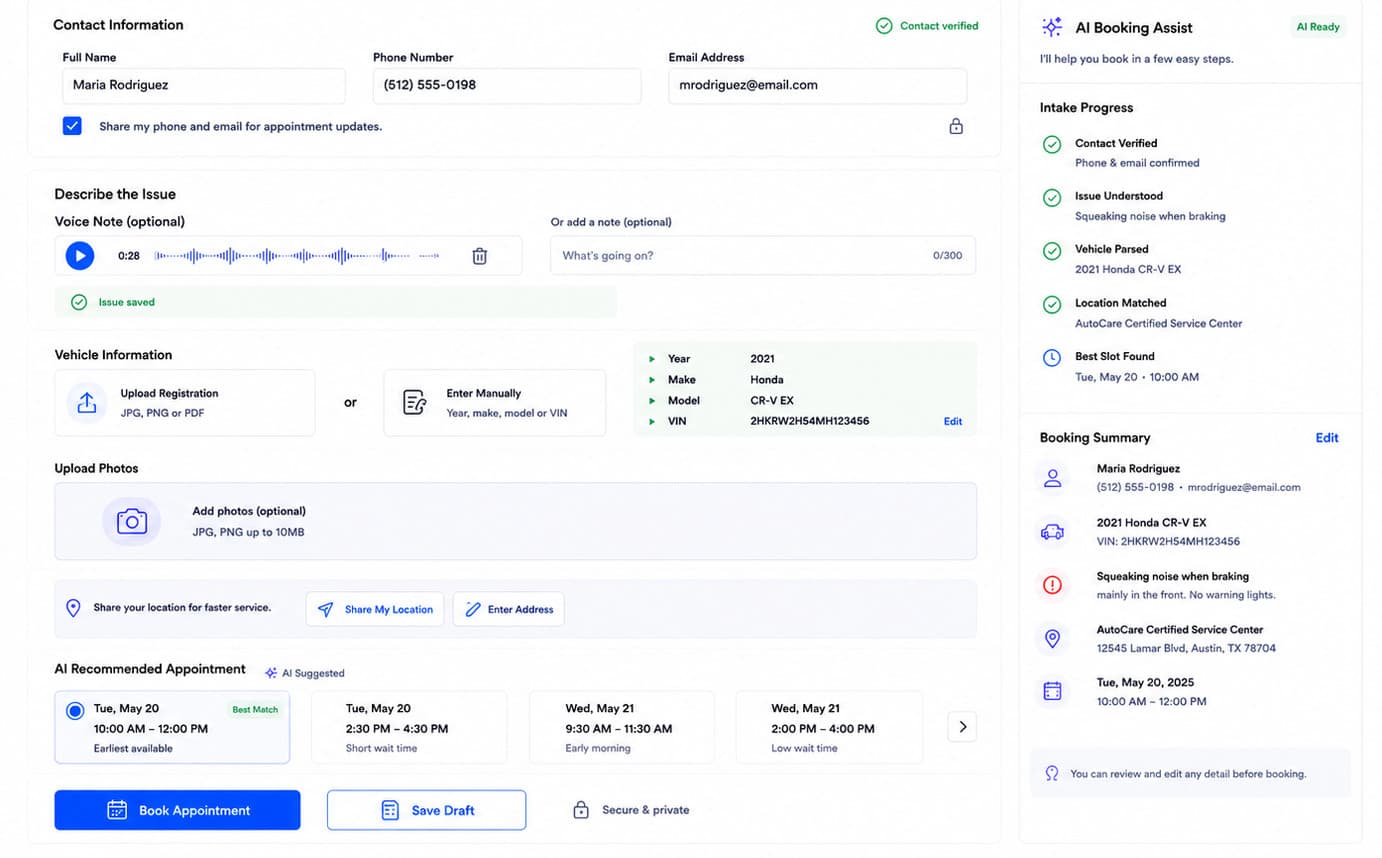
app.axlewright.ai/intakeLIVE · INTAKE
Customer Application Assistant — Axlewright.AI
Customer Application Assistant
Eliminate front-desk administrative bottlenecks. By guiding customers through a seamless, self-serve application process, your shop captures accurate, complete data instantly while significantly reducing the operational burden on service advisors.
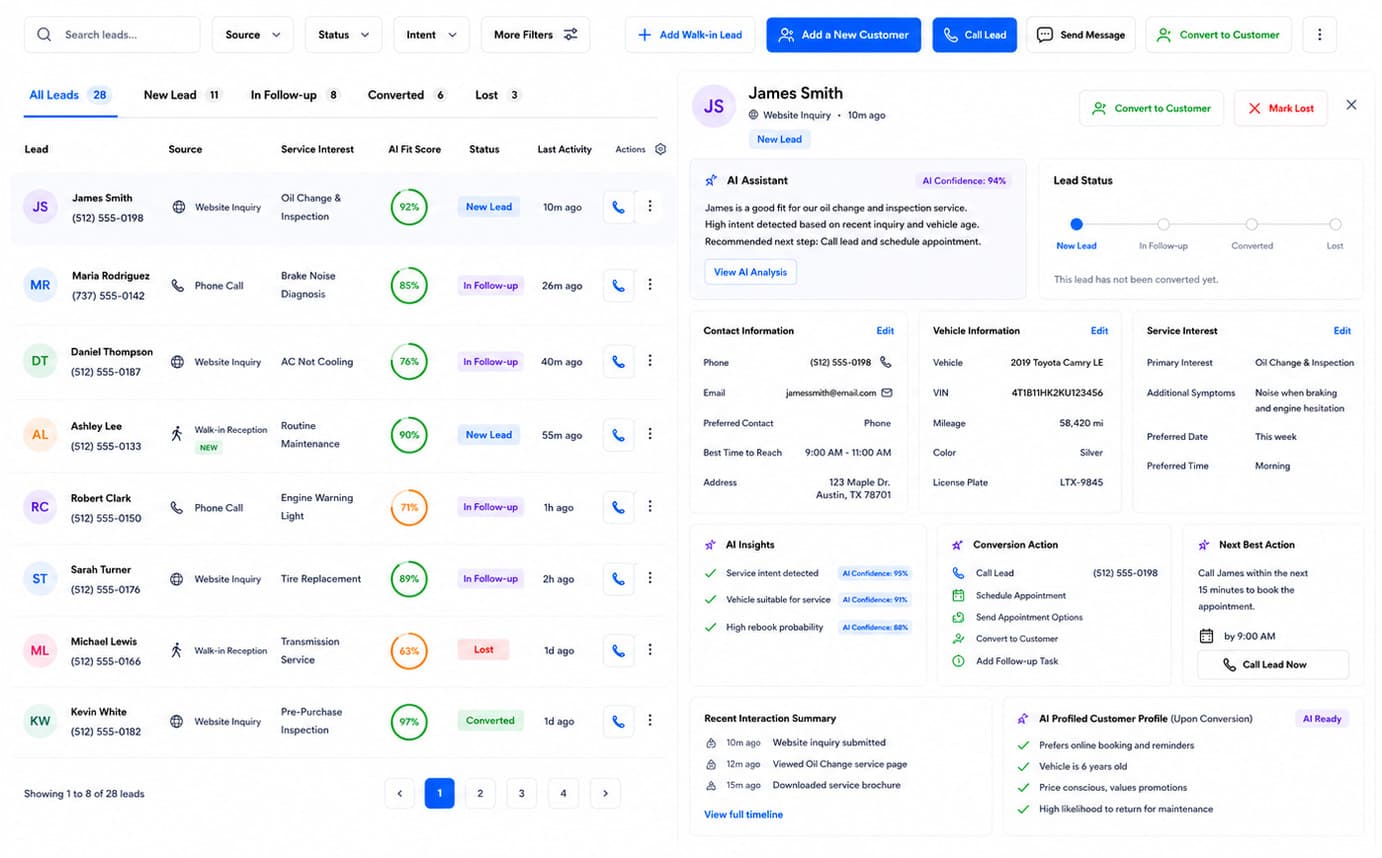
app.axlewright.ai/leadsLIVE · LEADS
Lead Conversion Assistant — Axlewright.AI
Lead Conversion Assistant
Maximize revenue from inbound inquiries. By intelligently scoring leads and predicting service intent, your team can prioritize high-value opportunities and increase overall conversion rates without wasting time on unqualified traffic.
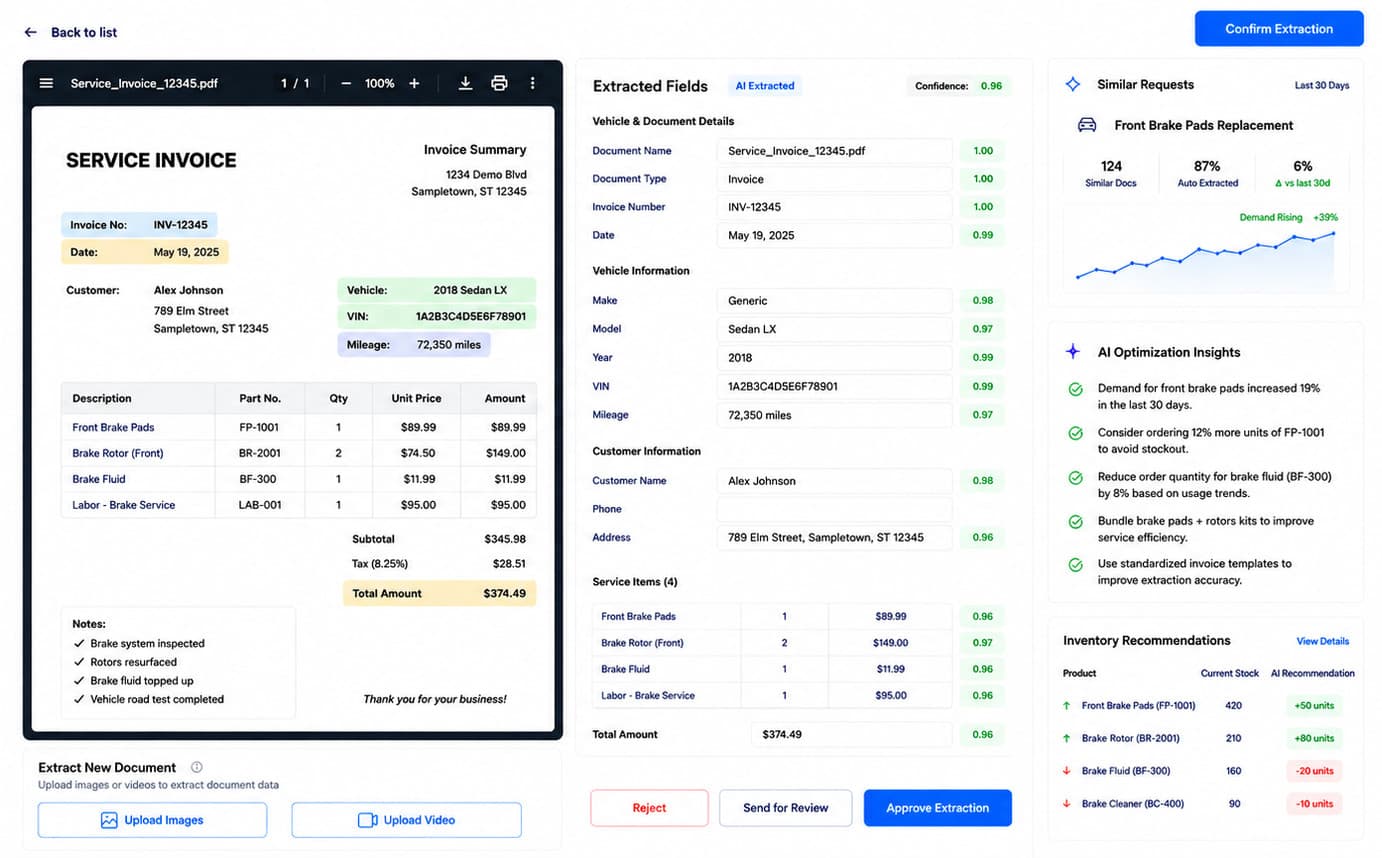
app.axlewright.ai/documentsLIVE · DOCUMENTS
Document Extraction Automation — Axlewright.AI
Document Extraction Automation
Accelerate administrative workflows and completely eliminate manual entry errors. Automatically converting physical and digital documents into structured, actionable data ensures total accuracy and speeds up every subsequent step in the service lifecycle.
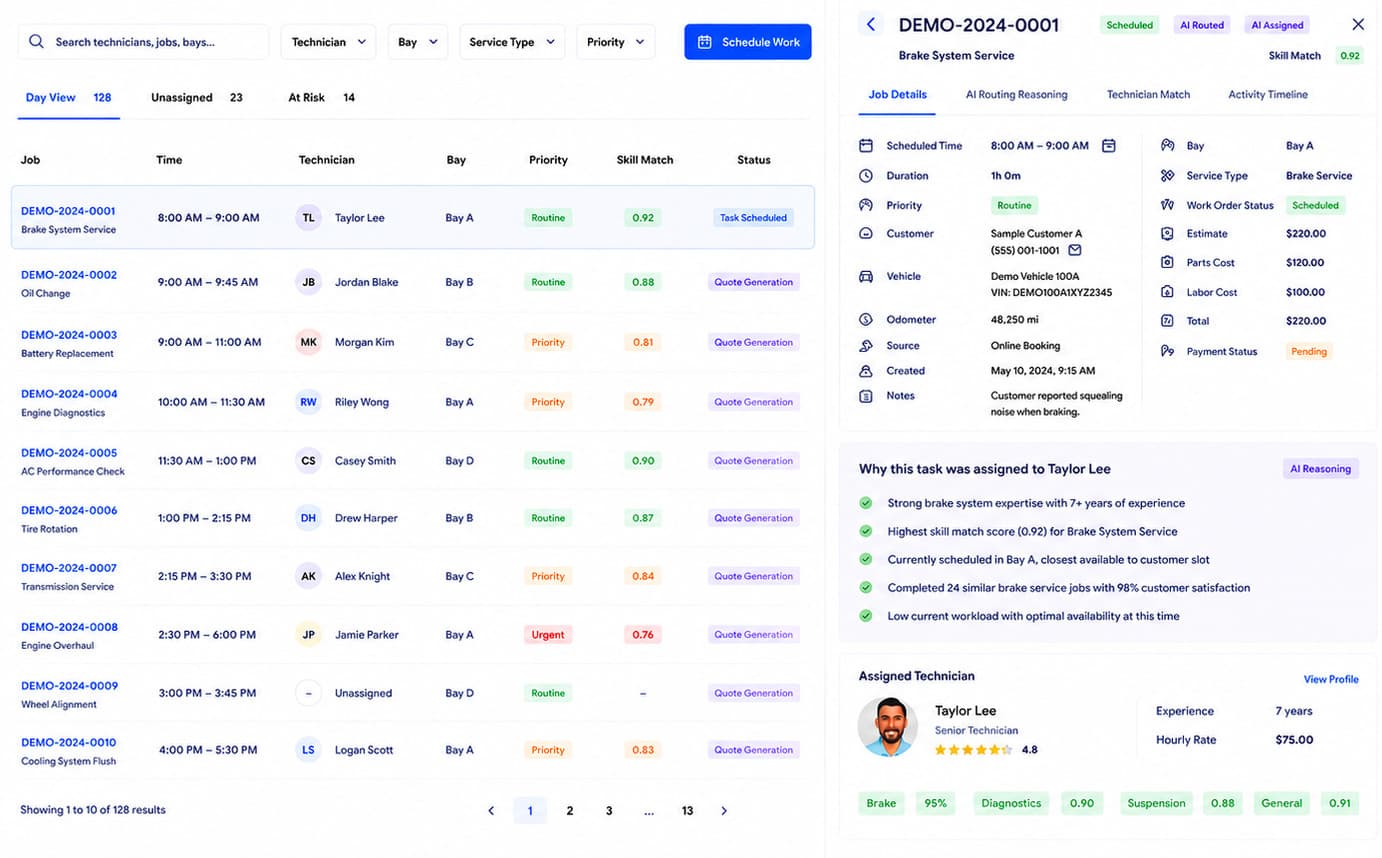
app.axlewright.ai/routingLIVE · ROUTING
Smart Routing Engine — Axlewright.AI
Smart Routing Engine
Maximize bay utilization and shop throughput. By strategically matching every job to the right technician based on skill sets and current availability, you minimize idle time and ensure complex repairs are handled efficiently.
app.axlewright.ai/quotesLIVE · QUOTES
Repair Quote Generation dashboard
Repair Quote Generation
An estimated quote drafted from the damage assessment.
Accelerate the approval process and close deals faster. By automatically mapping technician assessments to OEM repair codes, the platform drastically reduces the time advisors spend estimating costs.
app.axlewright.ai/inventoryLIVE · INVENTORY
Inventory Catalog Intelligence dashboard
Inventory Catalog Intelligence
Every part catalogued, risk-ranked, and reorder-ready
Reduce carrying costs and eliminate bay downtime caused by missing parts. The system intelligently forecasts demand and surfaces at-risk inventory lines before they disrupt your workflow.
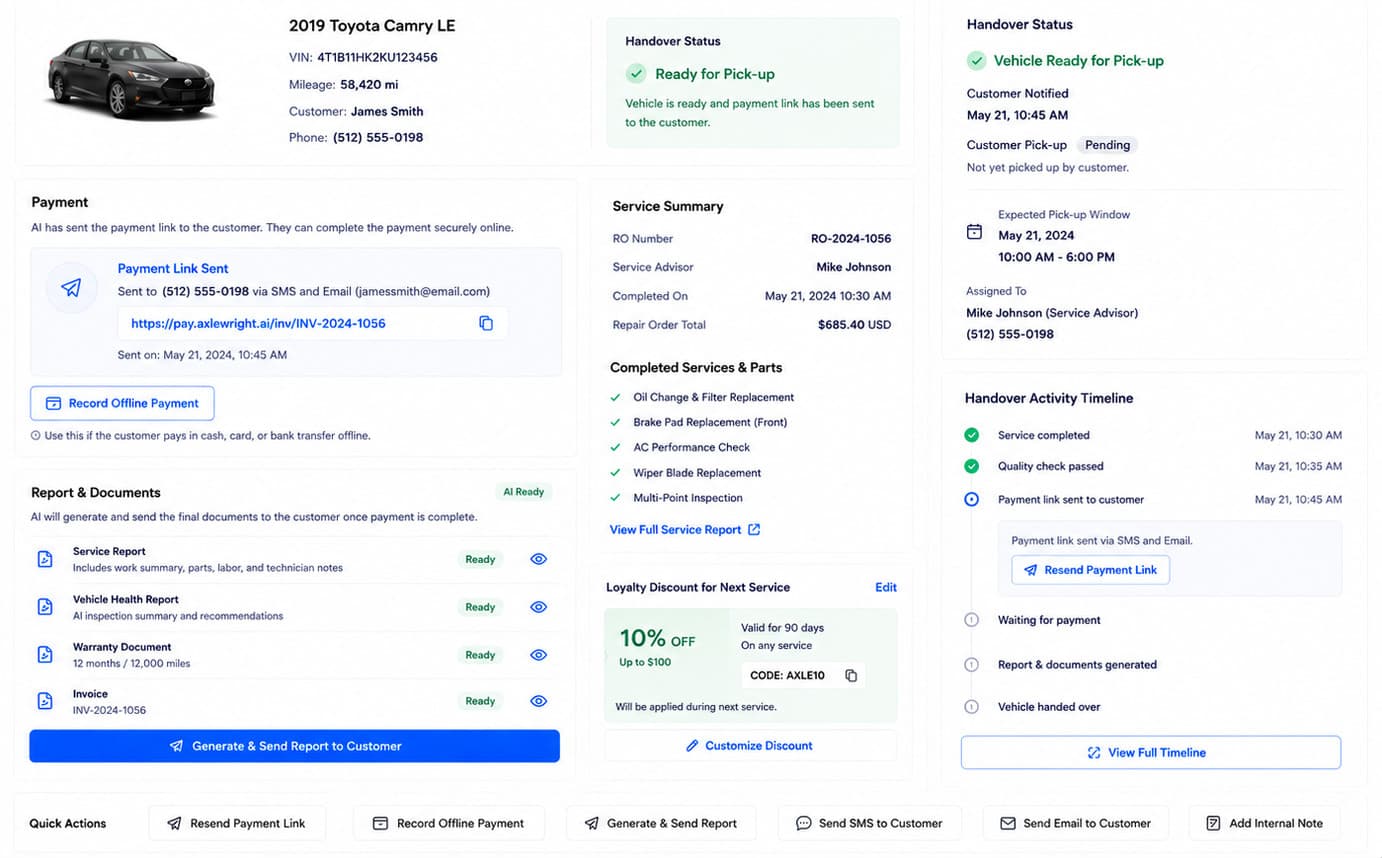
app.axlewright.ai/handoverLIVE · HANDOVER
Handover Automation dashboard
Handover Automation
From job completion to customer pickup — handled automatically
Deliver a premium customer experience that builds long-term loyalty. Automated reporting and invoicing ensure the customer receives professional, transparent documentation the moment a job concludes.
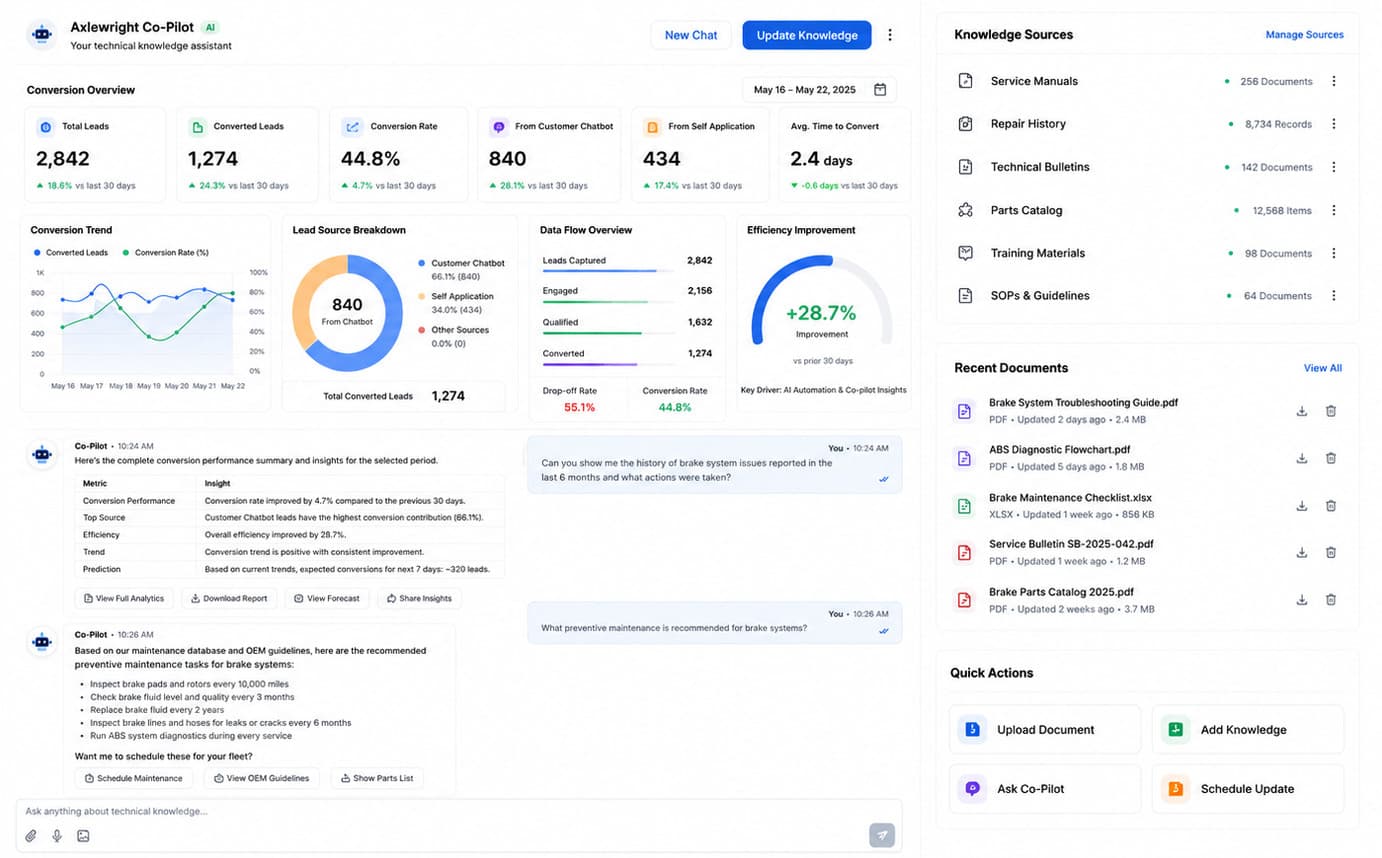
app.axlewright.ai/copilotLIVE · COPILOT
Technical Knowledge Co-pilot dashboard
Technical Knowledge Co-pilot
Upskill your entire workforce and slash diagnostic times. Providing instant, searchable access to OEM procedures and technical bulletins empowers junior technicians to solve complex issues independently, reducing bottlenecks in the bay.
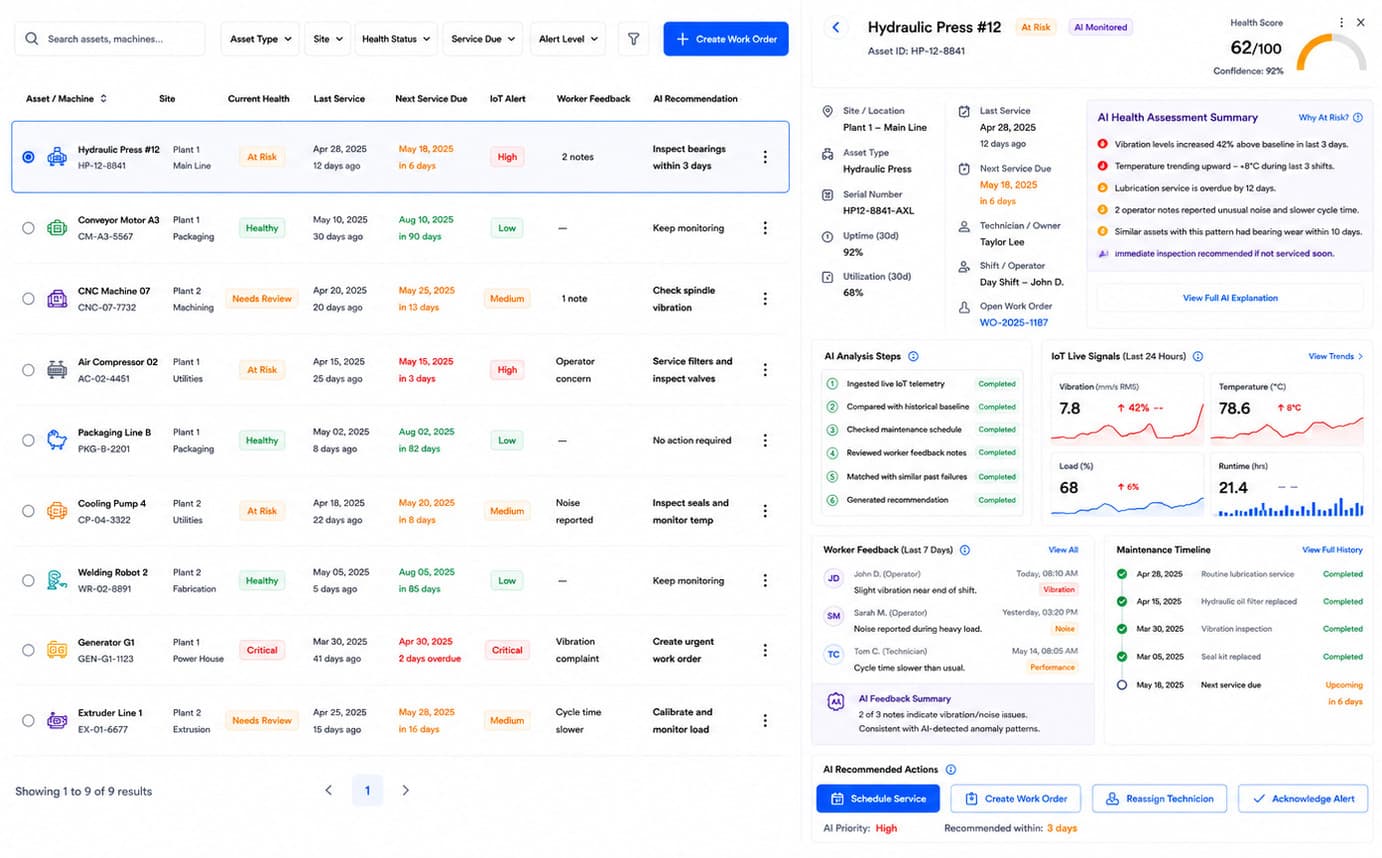
app.axlewright.ai/healthLIVE · HEALTH
Asset Health Monitoring dashboard
Asset Health Monitoring
Protect your capital investments and avoid catastrophic downtime. Proactively tracking the health and maintenance schedules of critical shop machinery extends asset lifespan and prevents costly operational stoppages.
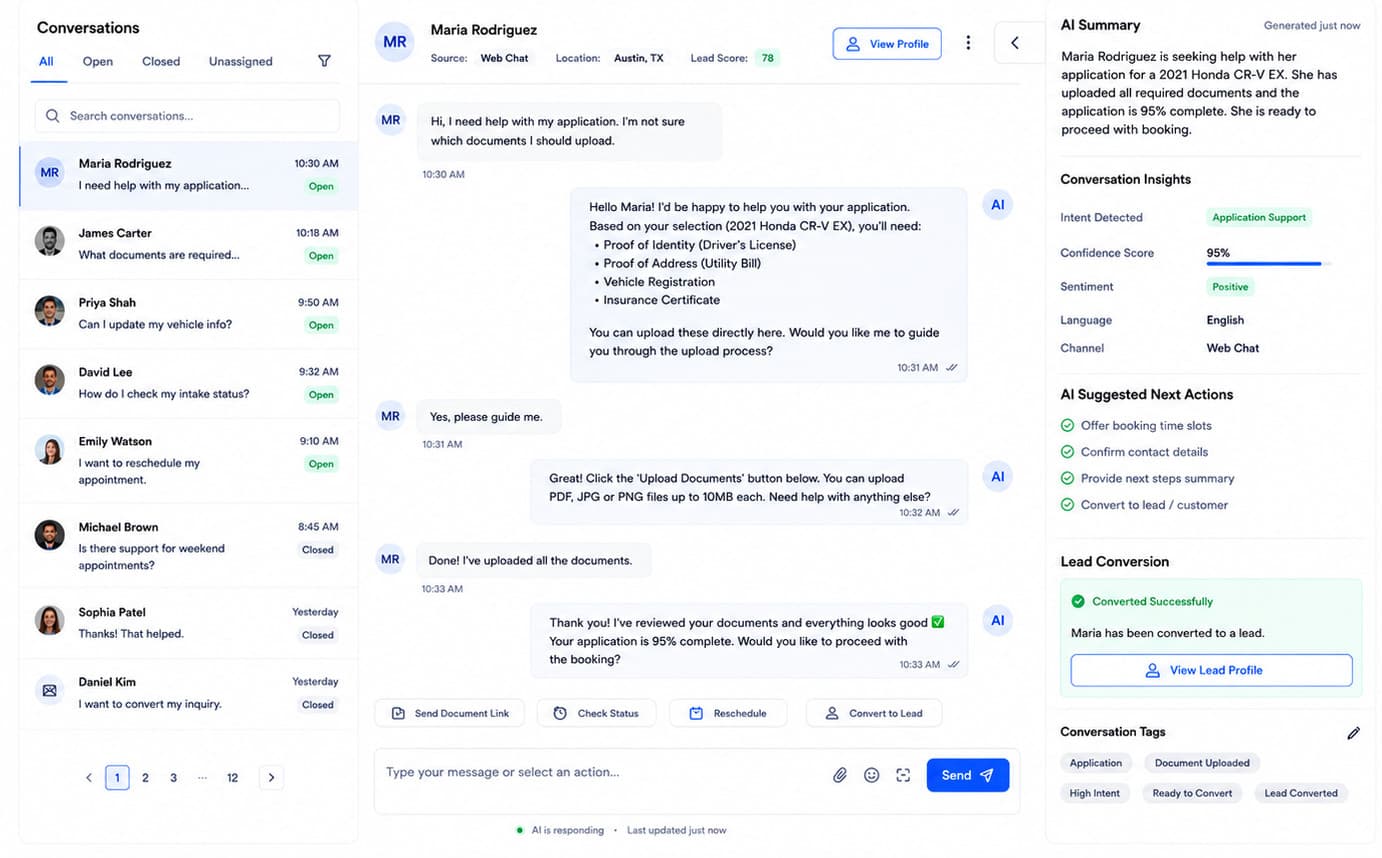
app.axlewright.ai/chatLIVE · CHAT
Customer Chatbot dashboard
Customer Chatbot
Provide instant, exceptional support around the clock. Capturing leads outside of normal business hours and resolving routine customer inquiries automatically ensures your shop remains responsive and competitive 24/7.
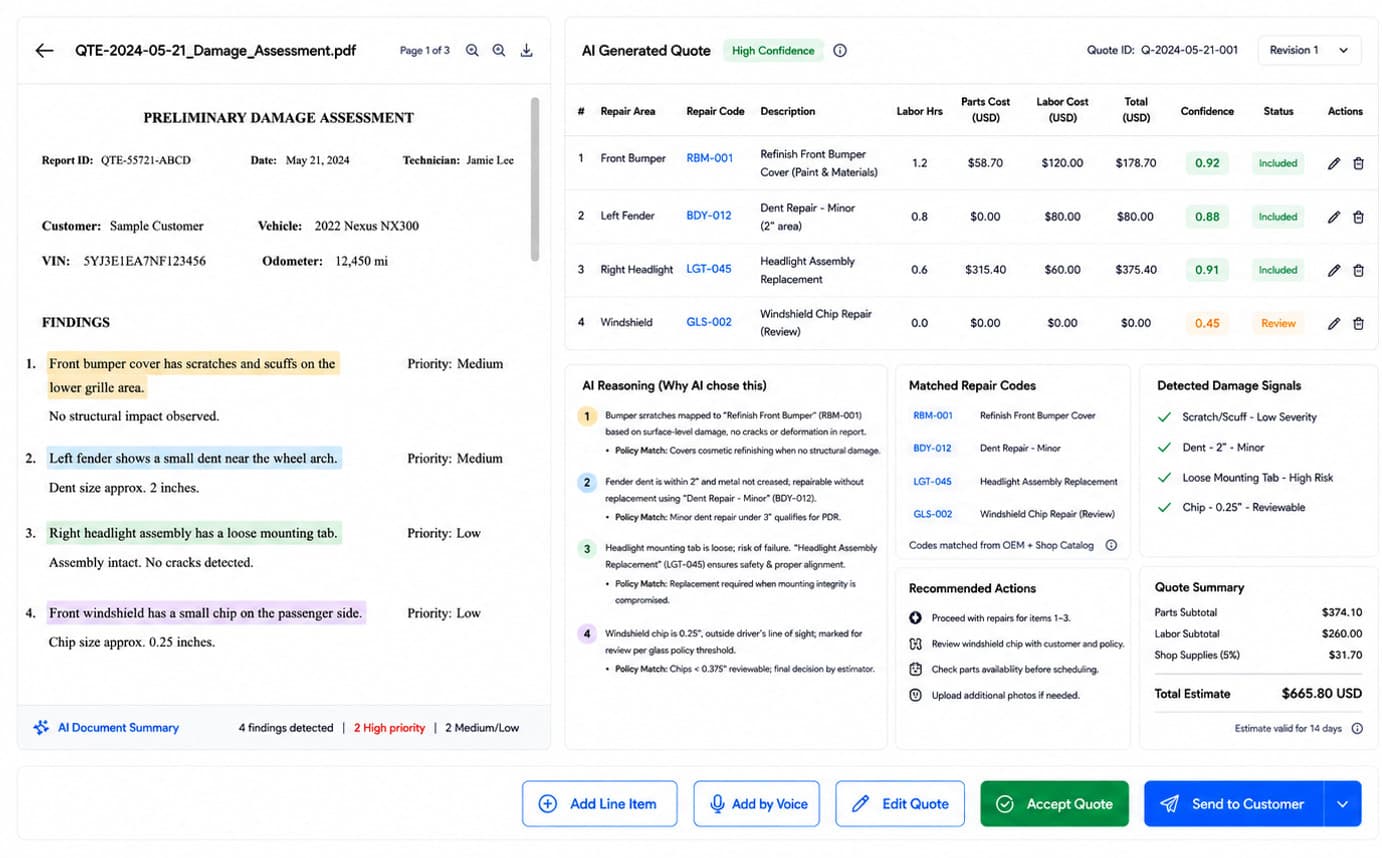
app.axlewright.ai/quotesLIVE · QUOTES
Repair Quote Generation — Axlewright.AI
Repair Quote Generation
An estimated quote drafted from the damage assessment.
Accelerate the approval process and close deals faster. By automatically mapping technician assessments to OEM repair codes, the platform drastically reduces the time advisors spend estimating costs.
This precision minimizes estimation errors that eat into margins, allowing your service team to present accurate, professional quotes before the customer even asks.
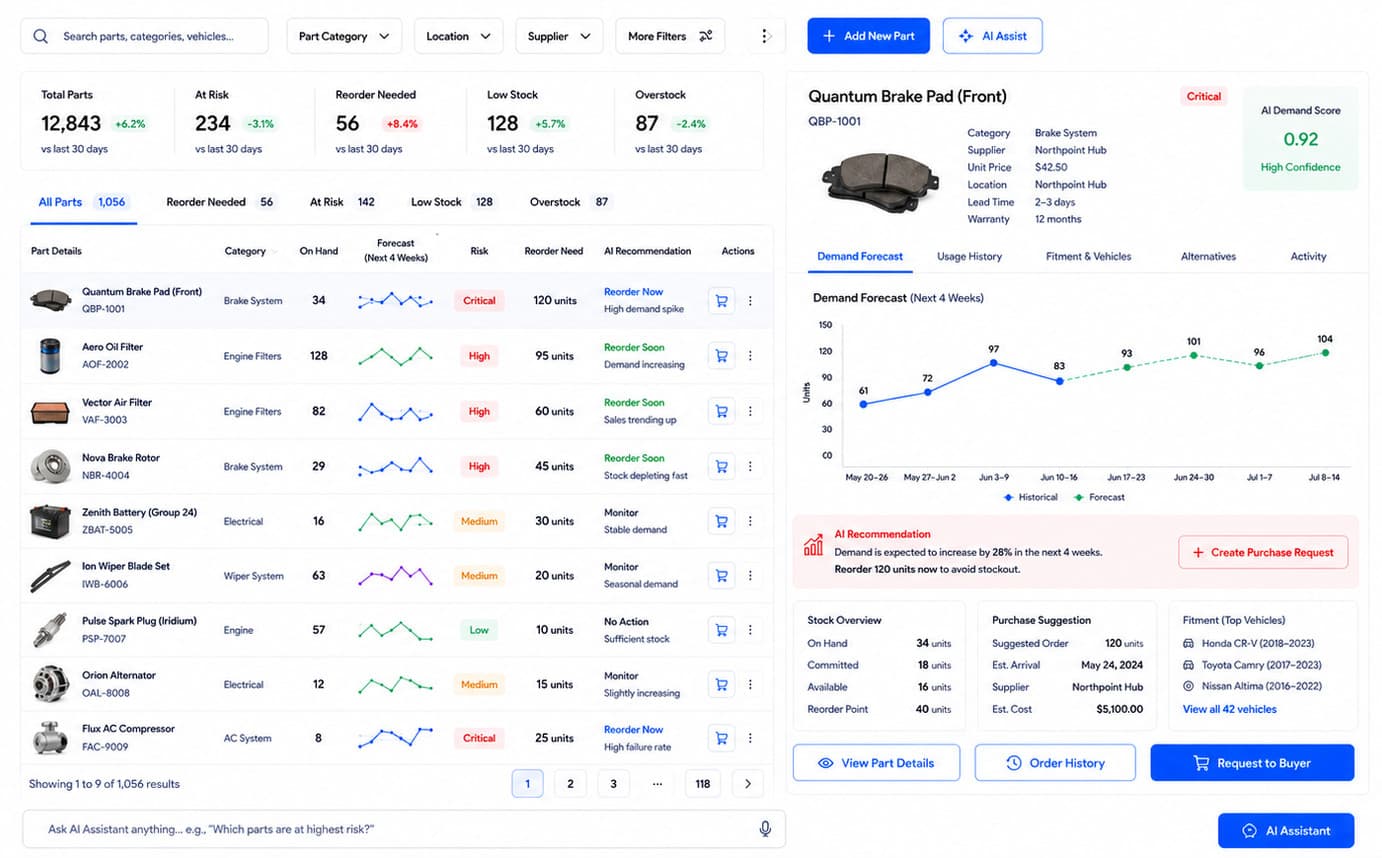
app.axlewright.ai/inventoryLIVE · INVENTORY
Inventory Catalog Intelligence — Axlewright.AI
Inventory Catalog Intelligence
Every part catalogued, risk-ranked, and reorder-ready
Reduce carrying costs and eliminate bay downtime caused by missing parts. The system intelligently forecasts demand and surfaces at-risk inventory lines before they disrupt your workflow.
With clear visibility into supplier lead times and fitment data, your parts desk can optimize cash flow by ordering based on predictive evidence rather than guesswork.
app.axlewright.ai/handoverLIVE · HANDOVER
Handover Automation — Axlewright.AI
Handover Automation
From job completion to customer pickup — handled automatically
Deliver a premium customer experience that builds long-term loyalty. Automated reporting and invoicing ensure the customer receives professional, transparent documentation the moment a job concludes.
By removing friction from the final step of the service cycle, you accelerate payment collection and allow advisors to focus on building relationships instead of chasing paperwork.
And the back office the bay depends on.
Stock, valuation and paperwork run off the same repair-order data — no separate spreadsheet, no second entry.
app.axlewright.ai/copilotLIVE · COPILOT
Technical Knowledge Co-pilot — Axlewright.AI
Technical Knowledge Co-pilot
Upskill your entire workforce and slash diagnostic times. Providing instant, searchable access to OEM procedures and technical bulletins empowers junior technicians to solve complex issues independently, reducing bottlenecks in the bay.
app.axlewright.ai/healthLIVE · HEALTH
Asset Health Monitoring — Axlewright.AI
Asset Health Monitoring
Protect your capital investments and avoid catastrophic downtime. Proactively tracking the health and maintenance schedules of critical shop machinery extends asset lifespan and prevents costly operational stoppages.
app.axlewright.ai/chatLIVE · CHAT
Customer Chatbot — Axlewright.AI
Customer Chatbot
Provide instant, exceptional support around the clock. Capturing leads outside of normal business hours and resolving routine customer inquiries automatically ensures your shop remains responsive and competitive 24/7.
How it works
From first message to final handover — three steps.
Axlewright.AI connects every stage of the job — intake, quoting, dispatch, and handover — on one AI layer. Your team handles the cars. The platform handles the rest.
Intake
01→
Customer in, record ready
The Customer Application Assistant captures contact details, a voice note, vehicle information and a preferred slot in one flow. The Smart Routing Engine reads the request and assigns it to the right team — before anyone picks up the phone.
Contact verified, vehicle parsed, and appointment slotted by AI
Inbound leads scored by AI fit score and service intent
Routing decisions are explainable — advisors see exactly why a job was assigned
Quote & Dispatch
02→
Quoted, approved, and on the board
Repair Quote Generation reads the technician's damage assessment PDF, maps every finding to OEM repair codes, and builds a fully itemised quote — parts cost, labour hours, confidence score — before the advisor picks up the phone.
Quote built from the damage assessment PDF with OEM repair codes
Parts cross-referenced against fitment, availability, and lead time
Document Extraction Automation files invoices and warranty PDFs automatically
Job Done
03
Closed out before the car leaves the lot
Handover Automation generates the service report, vehicle health report, warranty document, and invoice the moment the job is marked complete — and sends the payment link to the customer by SMS and email automatically.
Service report, invoice, and payment link sent automatically on job completion
Customer Chatbot handles follow-up queries 24/7 without an advisor
Asset health scored and at-risk equipment flagged before it causes a stoppage
Scale
More jobs processed without adding headcount
Speed
From customer message to bay assignment in minutes
Accuracy
AI-verified quotes, routes, and records every time
Margin
No billable hour lost, no urgent job missed
Traditional SaaS vs Axlewright.AI
Don’t settle for the AI your software chose.
Most platforms ship one model and you work inside its limits. Axlewright puts an orchestration layer between the repair order and the model, so every step of an intake runs on the intelligence that suits it.
Step of an intake
Traditional SaaS
Axlewright.AI
01
Read the scanned RO, VIN plate and warranty card
Layout-aware OCR holds the multi-column service table and the stamped VIN plate that a general model flattens
Built-in AI
Mistral
Mistral OCR API
02
Classify every symptom line by vehicle system
A fine-tuned classifier beats a frontier model per line, at a fraction of the cost
Built-in AI
Hugging Face
Inference Providers API
03
Read the whole vehicle history in one pass
Long context holds the full service file, so a note from three owners ago still binds a field today
Built-in AI
Gemini
Gemini API
04
Extract parts, labour, warranty and tax fields
Strict schema, so the record never comes back malformed into your DMS
Built-in AI
OpenAI
OpenAI Responses API
05
Draft the advisor notes and the customer explanation
Holds structure across thousands of words and cites the source line for each one
Built-in AI
Claude
Anthropic Messages API
06
Score every field, flag what is weak
Cheap enough to score the whole record twice, which is what makes the flags trustworthy
Built-in AI
DeepSeek
DeepSeek API
Result
Its limits, your problem
468 complete on arrival · 412 auto-routed · 91% mean confidence
01
Read the scanned RO, VIN plate and warranty card
Layout-aware OCR holds the multi-column service table and the stamped VIN plate that a general model flattens
Traditional SaaS
Built-in AI
Axlewright.AI
Mistral
Mistral OCR API
02
Classify every symptom line by vehicle system
A fine-tuned classifier beats a frontier model per line, at a fraction of the cost
Traditional SaaS
Built-in AI
Axlewright.AI
Hugging Face
Inference Providers API
03
Read the whole vehicle history in one pass
Long context holds the full service file, so a note from three owners ago still binds a field today
Traditional SaaS
Built-in AI
Axlewright.AI
Gemini
Gemini API
04
Extract parts, labour, warranty and tax fields
Strict schema, so the record never comes back malformed into your DMS
Traditional SaaS
Built-in AI
Axlewright.AI
OpenAI
OpenAI Responses API
05
Draft the advisor notes and the customer explanation
Holds structure across thousands of words and cites the source line for each one
Traditional SaaS
Built-in AI
Axlewright.AI
Claude
Anthropic Messages API
06
Score every field, flag what is weak
Cheap enough to score the whole record twice, which is what makes the flags trustworthy
Traditional SaaS
Built-in AI
Axlewright.AI
DeepSeek
DeepSeek API
Result
468 complete on arrival · 412 auto-routed · 91% mean confidence
Note: Model names and marks are the property of their owners and appear here to say which APIs an intake step can be routed to. No endorsement or partnership is implied. Families are named without version numbers because the frontier re-ranks faster than a page can be edited.
Connectivity
Your whole stack, connected.
Tekmetric, Mitchell 1, PartsTech, QuickBooks, Smartcar — and the rest of what your bays already run on. 24 integrations across 4 stages of an intake, every one of them reading the tool’s own API.
NHTSA vPICSmartcarGeotabSamsaraMotiveTwilioShopmonkeyTekmetricMitchell 1PartsTechEpicorKelley Blue BookNHTSA vPICSmartcarGeotabSamsaraMotiveTwilioShopmonkeyTekmetricMitchell 1PartsTechEpicorKelley Blue Book
Google CalendarSlackPodiumHubSpotAsanaZapierQuickBooksXeroStripeSquareGoogle DriveDropboxGoogle CalendarSlackPodiumHubSpotAsanaZapierQuickBooksXeroStripeSquareGoogle DriveDropbox
Note: Tool names and marks belong to their respective owners. No endorsement or partnership implied.
Compliance
The standards a service shop is held to.
Technician certification and card handling are audited at the shop, not at head office. Axlewright.AI keeps the evidence on the repair order as the work happens.
Note: These are standards the platform is built to support inside your workflows — obligations that fall on you as the licensee. They are not certifications held by us, and support in the product is not a substitute for your own counsel or compliance officer.
ASENational Institute for Automotive Service Excellence
Technicians must hold current ASE series for the work they take on. Dispatch checks each advisor's and technician's series against the jobs routed to them.
PCI DSSPayment Card Industry Data Security Standard
Card data must be handled to PCI DSS wherever it is captured or stored. Invoices hand off to your own processor — card numbers never touch the platform.
Add-ons
Add the hardware your workflow needs.
We build the devices too. Each one arrives pre-paired with your Axlewright.AI workspace and streams straight into a named dashboard module, so what happens in the bay reaches the ticket without anyone typing it in.
Intake Port Tag
Clips into the vehicle's diagnostic port the moment it rolls in and streams live fault codes and readiness status to your Service Intake Assistant. The advisor opens the ticket with the symptoms already triaged.
Bay Beacon
A magnetic low-energy tag that sits on each lift and stall and reports which bay a job is really occupying. Scheduling Dispatch Optimization then plans against measured bay time, not an estimate.
Note: Hardware, installation, and integration are not included in the standard subscription. Additional charges apply based on the hardware selected, integration modules required, and implementation scope.
Pricing
One flat price for the whole service bay.
No tiers to decode, no per-seat licences, no module you have to unlock later. One subscription covers the shop — intake through invoice — and it does not change when you hire your next technician.
Starting at
$200/mo
That covers all seven modules — service intake, repair quoting, scheduling and dispatch, inventory forecasting, vehicle valuation, parts catalogue intelligence and document extraction.
Every technician, advisor and bay in the shop — no per-seat maths
All seven dashboard modules, live from day one
Unlimited repair orders, estimates and vehicle records
Onboarding with your DMS, parts vendors and payment processor
Note: AI API usage is charged separately. Clients must recharge their AI credit balance based on their usage.
Onboarding
What your onboarding fee covers
One-time setup to connect your systems, import vehicle and repair history, and configure Axlewright.AI to your shop. Final pricing depends on integrations, data volume, security and deployment needs.
Essential
$1,000+one-time
Kickoff call to map your bays, service lanes and the systems you already run
Workspace provisioning with advisor, technician and manager roles set
Import of your active vehicle records, customers and open repair orders
Your parts price file loaded and matched against the live catalogue
Flat-rate labour book connected so quotes price against your own times
Intake triage routing configured to your service, quick-service and parts desks
Standard DMS or shop-management link connected for read and write-back
Go-live check across all seven modules before your first billing cycle
Plus
Most shops
$2,500+one-time
Everything in Essential, plus:
Guided migration of historical repair orders and service history, validated per VIN
Two integrations wired up — parts-vendor catalogues, payment processor or your DMS
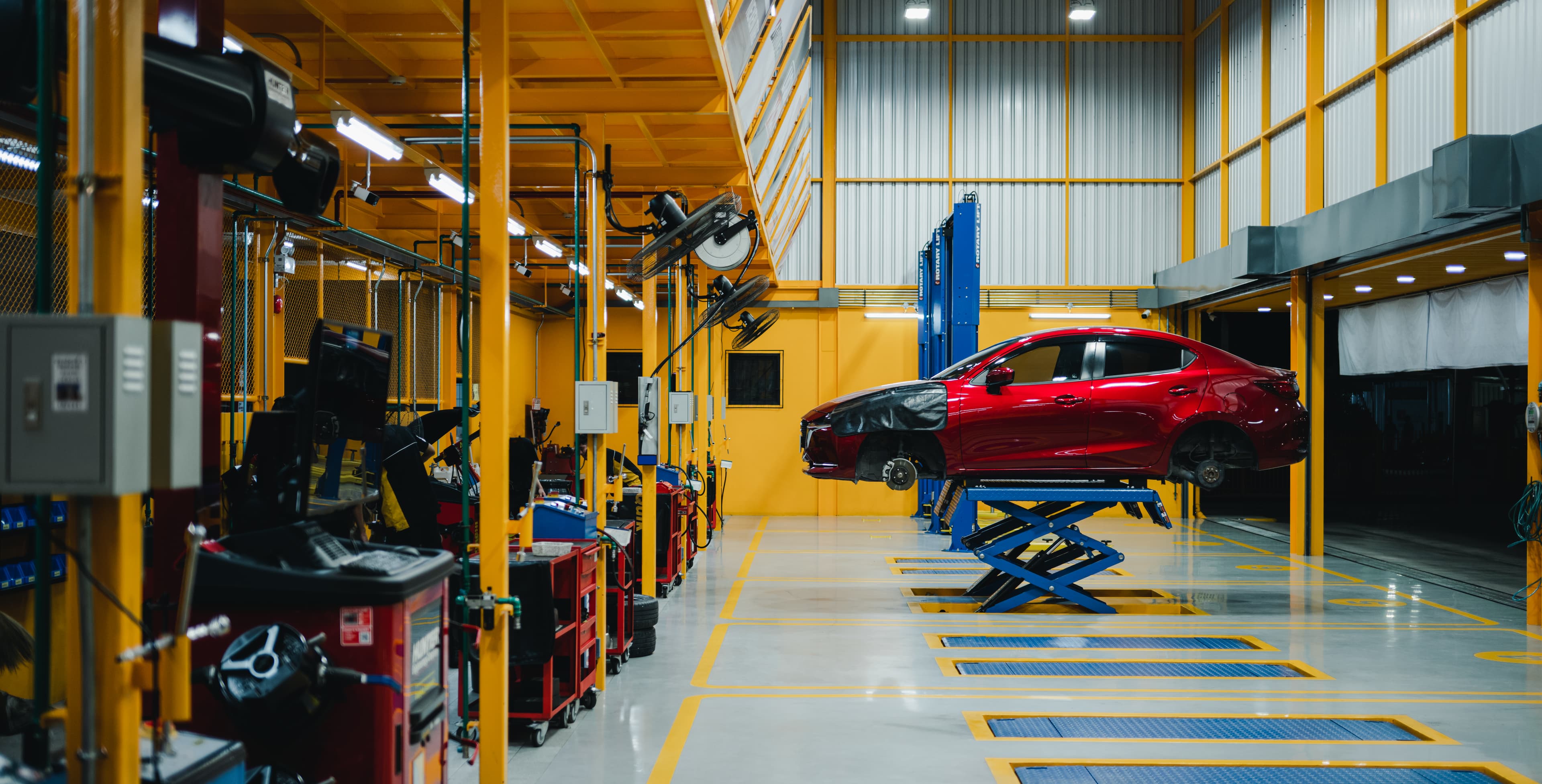
Dispatch tuned to your real bays, lifts, alignment racks and technician certifications
Custom estimate templates, approval thresholds and shop-supply and tax rules configured
Live training for advisors, the parts desk and technicians, with a recording
A dedicated onboarding specialist through your first weeks on the floor
Enterprise
$5,000+one-time
Everything in Plus, plus:
Rollout plan across multiple stores or franchise locations on shared standards
Bespoke DMS, accounting and SSO integrations built to your stack
Bulk migration of multi-year repair, parts and valuation history, cleansed and VIN-reconciled
Inventory demand forecasting calibrated to each location's consumption and lead times
Role-based training tracks and admin enablement for your service managers
A named onboarding manager with a committed go-live date across every site
Where it runs
Same platform, same monthly subscription — choose the deployment that fits your shop.
Cloud (SaaS)
Fastest to start
Runs in Axlewright.AI's managed cloud — we handle hosting, updates and scaling, so your bays are live in days with nothing to install.
Private / self-hosted
Your infrastructure
The same platform deployed inside your own cloud, VPC or on-prem — built for shops that keep VIN, repair-order and customer data in their environment. Predictions and analytics run where your data lives; the monthly subscription stays the same.
Axlewright ships
Agents that read real repair orders, every day.
Which is the easy half. They run against vehicles nobody inspected twice, on a model that shifts under them, for a shop that finds out something drifted when a torque spec comes back wrong.
Parts-lookup & fitment assistants
Service-scheduling agents
Both catalogued in playbook 2.04
→
Sister platform — Nestack Agent Care
Your automotive AI agents, run like production systems.
Telemetry, evaluations, guardrails, human review, and a crew on call when one of them starts drifting at 3am.
Automotive agents are catalogued under playbook 2.04.
FAQ
Questions from the service drive.
What Axlewright.AI does across intake, estimating, dispatch and parts — and what it expects from the shop you already run.
Still something specific to your floor? Book a demo and ask it on the call.
What does Axlewright.AI actually do?
It runs the service job end to end. Axlewright.AI takes the write-up at the door, triages the symptoms, prices the repair off your parts catalogue, schedules it against real bay time, forecasts what to re-order, values trade-ins and appraisals, and extracts the paperwork — estimate, invoice, warranty claim — on the way out. One record per vehicle, not seven systems arguing about it.
Does it replace my shop-management system?
It doesn’t have to. Most shops keep the DMS or shop-management system they already run and put the platform in front of it, so intake, quoting and dispatch happen here and the finished job writes back. If you’d rather run the whole floor on it, the modules cover that too — but replacing your system is a choice, not a condition of using it.
How does the AI symptom triage work?
Every intake — the customer’s own description, the advisor’s notes, the scan data — is read and sorted by system: engine, brakes, electrical, tyres, climate. The ticket is then routed to service advisor, quick service, parts or roadside, and the reasoning is shown next to the decision so an advisor can agree or override it in one click.
What happens to a low-confidence intake?
Nothing is auto-routed on a guess. Each ticket carries a confidence band, and anything below the threshold you set is held for a human to confirm before it moves — a vague complaint, a vehicle with conflicting scan codes, a first-time customer with no history. Those overrides feed back in, so the triage gets sharper on the work your shop actually sees.
How does repair quoting use the parts catalogue?
Quotes are priced against the live catalogue rather than a stale price book: current part numbers, supersessions, availability and your own cost, plus the labour time for the operation. Lines that need approval — warranty work, jobs over an agreed cap, a part with no local stock — are flagged before the estimate leaves the shop, and the version is held against the VIN for the next visit.
How does dispatch handle bay capacity?
Scheduling is built on what the shop really has: number of bays, which lift or alignment rack a job needs, technician skill and the hours already committed. A job is only placed where it fits, so a long diagnostic doesn’t land in a quick-service slot; when something overruns, the affected tickets are re-sequenced and the promised-time exposure is shown rather than discovered at 5pm.
What do you need from us for a demo?
Very little. A description of how your shop is laid out — bays, service lanes, the systems you run — and, if you want to see your own work in it, a sample of recent repair orders and a parts price file. Nothing needs to be connected or migrated to see the platform running.
How does pricing work?
One flat monthly price covering every module — intake, quoting, dispatch, inventory forecasting, valuation, parts catalogue and document extraction. There is no per-module upsell and no per-seat count on top; the current figure is in the pricing section above.